Remote Addressables
As you may know now, the SDK loads all of it’s files using Addressables. One of the big advantages of this system, is that it’s agnostic to where these files are hosted. They can be local to the project, or hosted remotely on a server.
The first thing you need to make sure you have for this to work, is to wait until the AddressablesManager finishes initializing, before loading any Addressable (remote or not).
Note
If you don’t wait, the game will probably run fine, but you will have issues trying to update content once the build is live and you push a DLC change.
Sprites and Localization
Let’s see an example of how to make sure our Sprites.csv and Localization.csv are both loaded remotely, so we can push fixes without the need of a new build.
As we mentioned before, the first thing we need to make sure is that AddressablesManager is the first thing to load, and then trigger both SpritesManager and LocalizationLoader.
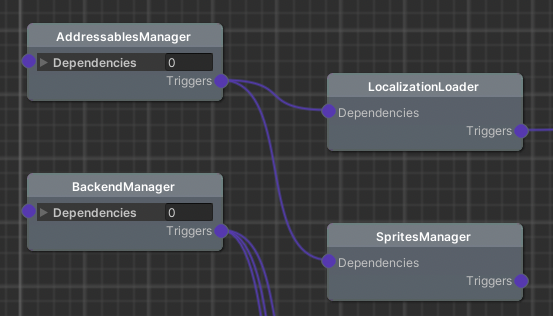
The next step is to make sure both files are Addressables, with the addressable names being Sprites and Localization.
Open the Addressables Groups window inside Unity, create a new group (lets call it remote_assets) and drag and drop both Sprites and Localization from the Default Local Group into this newly created group.

Now select the remote_assets group, and make sure you add 2 schemas to it in the inspector:
Content Packing & LoadingMake sure the Build Path is set to RemoteBuildPath and the Load Path to RemoteLoadPath.
Content Update RestrictionIn this schema, make sure you select ‘Can Change Post Release’.
The last thing we need to do, is to select the AddressablesAssetSettings.asset (found in Assets/AddressablesAssetsData), make sure ‘Build Remote Catalog’ is checked, and both Build and Load path are set to remote as well.
To have this fully working, you will also need to configure those Remote paths, as well as upload the generated bundles to a CDN. Please follow one of the following guides to do just that.
Note
Keep in mind that the Addressables need to be built for each of the platforms you want to support!
Remote Services