Sprite Compression
It’s very important for every game that we release, that the sprites in it are correctly compressed, and with the appropriate formats set.
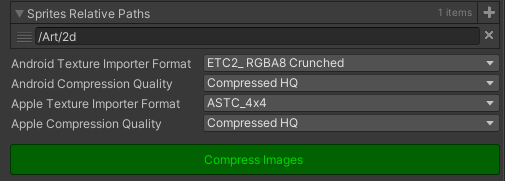
To automate all of this, the first step is to go to Assets/Configurations and create a new Sprite Compression Configuration file (right click -> Create -> Configurations -> Sprite Compression).
Parameters
Parameter |
Default |
Description |
|---|---|---|
SpritesRelativePaths |
List of all the paths where you have sprites, relative to |
|
Android Texture Importer Format |
ETC2_RGBA8 Crunched |
Texture importer for Android |
Android Compression Quality |
Compressed HQ |
The quality we want to use for the compression |
Apple Texture Importer Format |
ASTC_4x4 |
Texture importer for Apple |
Apple Compression Quality |
Compressed HQ |
The quality we want to use for the compression |
Note
If for any reason, you need to change the settings to something different, discuss it first with Gaston or Martin.
Once you have the file configured, click on Compress Images.