Setup
To setup the analytics in your game, go to the folder Assets/Configuration (create it if it doesn’t exist).
Inside that folder, create an Analytics Configuration file (right click -> Create -> Configurations -> Analytics -> Main). You will probably need a different one for each environment. Once it’s created, make sure you assign it to the corresponding SDK Configuration file for that environment.
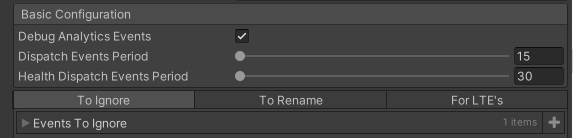
Once you have it created and assigned to the appropriate environment, make sure you set up the parameters as needed.
Warning
Leaving the Debug Analytics Events turned on has a great performance impact. Make sure this is disabled when making production builds.
Parameter |
Description |
|---|---|
Debug Analytics Events |
Prints out to console everything that is sent as an event with its payload |
Dispatch Events Period |
Seconds to wait in between dispatches of events. If the game is closed before a send happens, the events are stored locally until the next session |
Health Dispatch Events Period |
Seconds to wait in between health events ( |
To Ignore |
List of events to ignore sending |
To Rename |
Key value pair used to rename events |
For LTE’s |
List of events that will be sent as a new event {eventName}_LTE if it’s triggered inside an event |