Dependency Manager
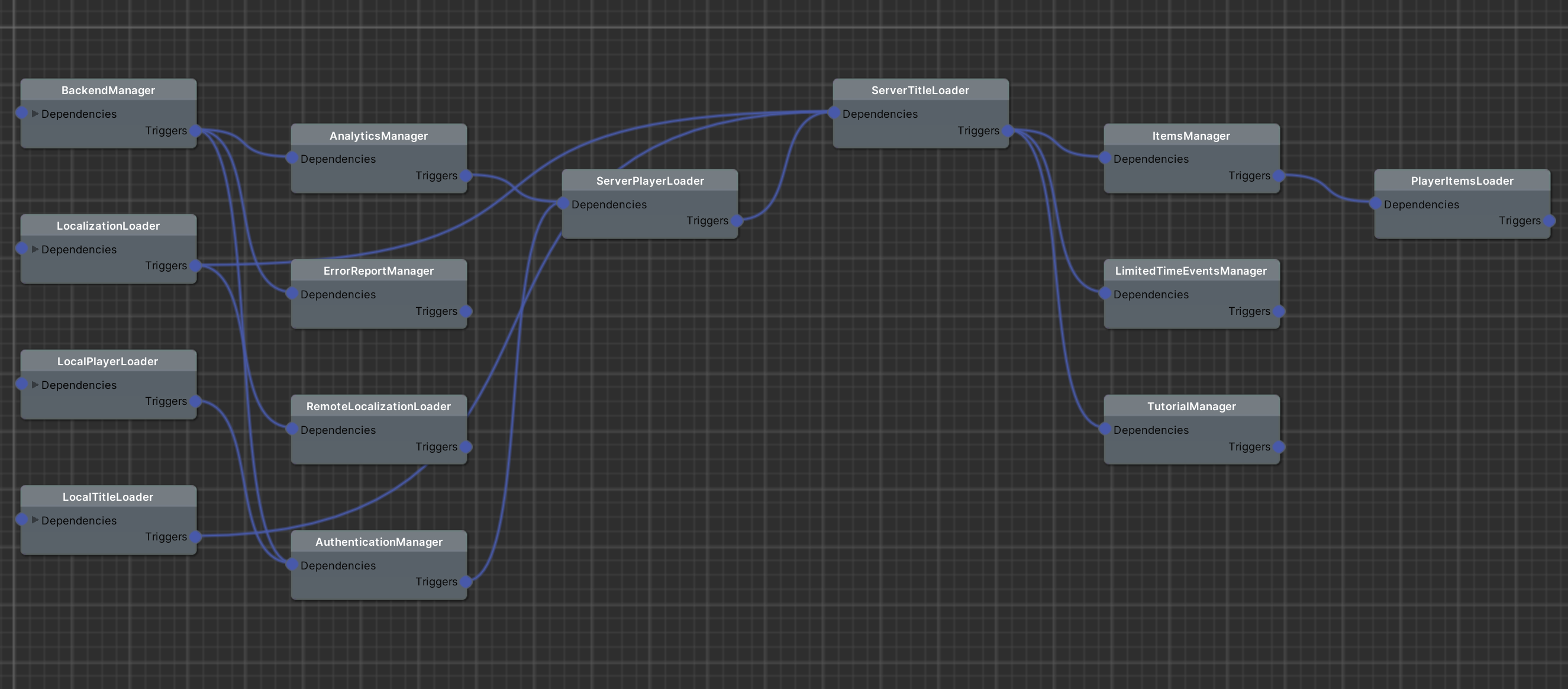
If you already have the Initialize scene setup, you will see that it has a DependencyManager. As the name suggests, this manager is in charge of handling all of the dependencies between other managers or scripts (for example, to start loading a component C, component A & B need to finish first).
Setup
The first thing you need to do, is to create a Graph for your DependencyManager. To do this, you can Right Click -> Create -> Dependency Graph, and assign it to the Graph variable. If you now click on the Open Graph button in the inspector, you can see that it’s empty.
The main components that makes this system work are ILoadable & LoadableSingleton. Both these components need a StartLoading() method to be implemented, and once you do whatever it is that needs to be done here that others must wait for, you need to return FinishedLoading(true/false) so the rest of the dependencies can load.
Note
Most of the managers in the SDK already implement ILoadable, so they can be used by this system, like you can see in the Initialize scene.
Once you have all of the GameObjects in the scene with the components that implent ILoadable, you need to build the graph of dependencies. This is really easy to do.
If you take a look, each of the components have a list of Triggers. These are other ILoadable’s that will start loading once this one is finished.
The last thing to do, is to go to the DependencyManager script, and make sure you set at least one as a starting point, assigning it to the Things To Load.
Note
At any point, you can press the Refresh Graph button, and open the Graph to make sure it reflects the dependencies correctly.